Wednesday, March 4, 2020

Technical Skills Development
Camera
We created a short film in which i had to use as many skills as possible without breaking the continuity as this could have made the confused the audience. During filming i personally did not use the camera as there was too many people using equipment, but during filming i was one of the actors in the short film, i was the kid in the yellow coat who pushes the main actor after he gets a low grade. The end result seems quite alright considering the idea we had. From this short film filming project i learnt that a good defined shot can be shot without the need of a ridiculously expensive camera.
Sound
When we were learning about sound we were given a boom microphone and a script, what we were asked to do is to create 6 different audio files whilst recording with the boom mic when we was outside. The first audio file was with a cover on the microphone which would block out the wind and the second file was without the cover which stopped most of the wind from entering the microphone which made the audio sound a lot better. From this sound project i found that not a whole lot of effort needs to be put into making good sound.
Lighting
When we were learning about lighting we were split into two groups where we were given a camera, three sets of lights and gel colours. With this equipment we was asked to take photos under a certain criteria such as low key lighting. We used one person as a 'model' and the rest of the 'cast' was adjusting the lights and taking photos with a camera. We also created a lot of photos with the colour gels where we changed the colour of the lighting to red and blue which allowed us to take photos with 'feeling' in them. The following photos will show what we created with the use of lighting. From this i learnt that lighting is quite difficult to control, but if controlled correctly the effect of lighting can be crucial to a scene.


We created a short film in which i had to use as many skills as possible without breaking the continuity as this could have made the confused the audience. During filming i personally did not use the camera as there was too many people using equipment, but during filming i was one of the actors in the short film, i was the kid in the yellow coat who pushes the main actor after he gets a low grade. The end result seems quite alright considering the idea we had. From this short film filming project i learnt that a good defined shot can be shot without the need of a ridiculously expensive camera.
Sound
When we were learning about sound we were given a boom microphone and a script, what we were asked to do is to create 6 different audio files whilst recording with the boom mic when we was outside. The first audio file was with a cover on the microphone which would block out the wind and the second file was without the cover which stopped most of the wind from entering the microphone which made the audio sound a lot better. From this sound project i found that not a whole lot of effort needs to be put into making good sound.
Lighting
When we were learning about lighting we were split into two groups where we were given a camera, three sets of lights and gel colours. With this equipment we was asked to take photos under a certain criteria such as low key lighting. We used one person as a 'model' and the rest of the 'cast' was adjusting the lights and taking photos with a camera. We also created a lot of photos with the colour gels where we changed the colour of the lighting to red and blue which allowed us to take photos with 'feeling' in them. The following photos will show what we created with the use of lighting. From this i learnt that lighting is quite difficult to control, but if controlled correctly the effect of lighting can be crucial to a scene.
Tuesday, February 25, 2020
Tuesday, January 28, 2020
Single Camera Production Techniques
This essay is about Single Camera Techniques with slight comparison to Multi Camera Work.
Within the essay I will talk about Cameras, Lighting, Sound, Editing , Single Camera Genres and Formats and Multi Camera Techniques.
1. Camera
With a Single Camera Production, there will mostly be one camera shooting the production, there might be parts of the shoot that will need more than one camera in a scene where a character has to for example destroy a whole set so that we can get more shots of the same scene, but other than high action the rest will be shot with a single camera. This was used in Citizen Kane when Kane had to destroy a whole room dedicated to one of his wives, more than one camera was used in case the actor accidentally steps in front of the action and one of the cameras could not capture it.
Directors tend to use more single camera production mainly because they can have more control over the camera and its easier to reset shots which means that they can make every single shot as good as they possibly can where as in a multi camera shot it might be more difficult for the director to interact perfectly.
Single camera production may be more difficult for the actors as they will have to remember more lines for the shot as single camera shots tend to film whole scenes at once and then shoot them over and over again with the same camera but in a different position. This sometimes is hard for the actors as they might not be persistent with their acting between two different shots.
If the same shot is shot multiple times, actors can't really improvise anything where as in multi camera production its easier for an actor to improvise. In Avengers Age Of Ultron, Robert Downey Jr took the whole cast by surprise as he decided to hide a lot of snacks around the set for him to eat during the shooting, after a while of the multi camera production the director decided to allow him to keep doing it as it was a good trait for his character and it would be something that Tony Stark would do, one of the most known improvised quotes from Robert was "blueberry?" where after a very important thing said by Downey, he offered Mark Ruffalo a blueberry.
2. Sound
Sound is very important in production, if the sound is not great then it can jeopardize the whole production.
There are many ways to record sound in production, in News there are a few different types of way to record sound.
Repel Microphone:
These microphones are small and can be attached to a top or side of a suit. These are used predominately in interviews which may take a while to record if something goes wrong, this saves a person standing and holding a boom microphone. The audio from the repel microphone is good as it is placed very close to the users mouth.
News Microphone:
A microphone is designed to repel the wind, most of the news microphones which are used outside where it tends to be windy there will be a foam ball on top of the microphone to stop the wind.
In production, one of the most important people is the boom microphone holder, he is trained to hold the microphone up for a very long period of time, and also to follow the character, if the microphone is not above the characters head the sound may differ within the scene, The boom microphone may also be used from down below pointed up in scenes which are shot from below, this allows the sound to travel straight to the microphone.
3. Coverage
Coverage is the term for the amount of film captured and good coverage means that there are plenty of options to choose from, which means that there needs to be more than one shot of the same scene.
If it occurs that you do not obtain enough footage and whilst editing you spot a continuity error there might be no way to re-shoot the scene. This shows us that coverage must be large in production else small problems may occur which could lead to larger problems.
Continuity errors are not fun to deal with, especially when you spot it after watching the movie the second time. Gladiator is a movie which contains at least two continuity shot within it, there is some sort of piston device under the carriage of a horse which should have been concealed and there was a plane in the sky in one of the shots. These errors were not taken out of the movie due to either not enough coverage or silly errors within the editing industry.
When it comes to filming, it is easier to obtain more coverage with a multi camera system but it may take longer to set up when an error within filming has been made where as in single camera production it is a lot more easier for the camera to be reset to its previous position so that acting may continue as quickly as possible.
4) Lighting
The lighting in single camera production is a whole lot easier to control than a multi camera production, mainly due to the fact that there is less equipment involved. This allows it to take up less room which also means that there will be less time wasted to find the optimum position for both the camera and lighting.
There are a lot of different examples of how lighting can be designed to create different effects on camera. These are a few examples:
PHOTOS
5) Single camera genres and formats
There are 7 different genres and formats in single camera production, The following are the seven:
Period. Crime Drama, Horror, Comedy, Series, Serial, Single Drama.
All of these apart from the horror are designed to be set out episode by episode. Episodes are easier to film with one camera due to the swiftness of production.
Horrors use single camera production in films where POV's can be used and canted angles to add a more off putting scenario for the viewer. This will make it more anticipating when you're awaiting a jump scare.
6) Multi camera techniques
For some films and programmes the amount of action there is it would not be possible to cover the scenes with only one camera. This is where multi-camera techniques step in.
Multi camera techniques are good and necessary for filming products that are live or cannot be reshot, mainly because if it will be reshot there will be a continuity error which may put someone off with watching the rest of a production.
With a multi camrea techniques there are far less re shoots which is good mainly because there will be less continuity errors and less time will be wasted on filming.
With a multi camera set up the lighting will be difficult to manage as it may look fake and flat.
Also, the director does not have full control of the camera where as in single camera production the director is in full control of the camera.
Within the essay I will talk about Cameras, Lighting, Sound, Editing , Single Camera Genres and Formats and Multi Camera Techniques.
1. Camera
With a Single Camera Production, there will mostly be one camera shooting the production, there might be parts of the shoot that will need more than one camera in a scene where a character has to for example destroy a whole set so that we can get more shots of the same scene, but other than high action the rest will be shot with a single camera. This was used in Citizen Kane when Kane had to destroy a whole room dedicated to one of his wives, more than one camera was used in case the actor accidentally steps in front of the action and one of the cameras could not capture it.
Directors tend to use more single camera production mainly because they can have more control over the camera and its easier to reset shots which means that they can make every single shot as good as they possibly can where as in a multi camera shot it might be more difficult for the director to interact perfectly.
Single camera production may be more difficult for the actors as they will have to remember more lines for the shot as single camera shots tend to film whole scenes at once and then shoot them over and over again with the same camera but in a different position. This sometimes is hard for the actors as they might not be persistent with their acting between two different shots.
If the same shot is shot multiple times, actors can't really improvise anything where as in multi camera production its easier for an actor to improvise. In Avengers Age Of Ultron, Robert Downey Jr took the whole cast by surprise as he decided to hide a lot of snacks around the set for him to eat during the shooting, after a while of the multi camera production the director decided to allow him to keep doing it as it was a good trait for his character and it would be something that Tony Stark would do, one of the most known improvised quotes from Robert was "blueberry?" where after a very important thing said by Downey, he offered Mark Ruffalo a blueberry.
2. Sound
Sound is very important in production, if the sound is not great then it can jeopardize the whole production.
There are many ways to record sound in production, in News there are a few different types of way to record sound.
Repel Microphone:
These microphones are small and can be attached to a top or side of a suit. These are used predominately in interviews which may take a while to record if something goes wrong, this saves a person standing and holding a boom microphone. The audio from the repel microphone is good as it is placed very close to the users mouth.
News Microphone:
A microphone is designed to repel the wind, most of the news microphones which are used outside where it tends to be windy there will be a foam ball on top of the microphone to stop the wind.
In production, one of the most important people is the boom microphone holder, he is trained to hold the microphone up for a very long period of time, and also to follow the character, if the microphone is not above the characters head the sound may differ within the scene, The boom microphone may also be used from down below pointed up in scenes which are shot from below, this allows the sound to travel straight to the microphone.
3. Coverage
Coverage is the term for the amount of film captured and good coverage means that there are plenty of options to choose from, which means that there needs to be more than one shot of the same scene.
If it occurs that you do not obtain enough footage and whilst editing you spot a continuity error there might be no way to re-shoot the scene. This shows us that coverage must be large in production else small problems may occur which could lead to larger problems.
Continuity errors are not fun to deal with, especially when you spot it after watching the movie the second time. Gladiator is a movie which contains at least two continuity shot within it, there is some sort of piston device under the carriage of a horse which should have been concealed and there was a plane in the sky in one of the shots. These errors were not taken out of the movie due to either not enough coverage or silly errors within the editing industry.
When it comes to filming, it is easier to obtain more coverage with a multi camera system but it may take longer to set up when an error within filming has been made where as in single camera production it is a lot more easier for the camera to be reset to its previous position so that acting may continue as quickly as possible.
4) Lighting
The lighting in single camera production is a whole lot easier to control than a multi camera production, mainly due to the fact that there is less equipment involved. This allows it to take up less room which also means that there will be less time wasted to find the optimum position for both the camera and lighting.
There are a lot of different examples of how lighting can be designed to create different effects on camera. These are a few examples:
PHOTOS
5) Single camera genres and formats
There are 7 different genres and formats in single camera production, The following are the seven:
Period. Crime Drama, Horror, Comedy, Series, Serial, Single Drama.
All of these apart from the horror are designed to be set out episode by episode. Episodes are easier to film with one camera due to the swiftness of production.
Horrors use single camera production in films where POV's can be used and canted angles to add a more off putting scenario for the viewer. This will make it more anticipating when you're awaiting a jump scare.
6) Multi camera techniques
For some films and programmes the amount of action there is it would not be possible to cover the scenes with only one camera. This is where multi-camera techniques step in.
Multi camera techniques are good and necessary for filming products that are live or cannot be reshot, mainly because if it will be reshot there will be a continuity error which may put someone off with watching the rest of a production.
With a multi camrea techniques there are far less re shoots which is good mainly because there will be less continuity errors and less time will be wasted on filming.
With a multi camera set up the lighting will be difficult to manage as it may look fake and flat.
Also, the director does not have full control of the camera where as in single camera production the director is in full control of the camera.
Monday, January 6, 2020
Commissioning Process
There are a lot of responsibilities in the production industry during the commissioning process, each role contains a different job which has to be completed for the commissioning process to continue with its progress.
The Script Department:
The screenplay provides a blueprint for the entire film making process. It begins with a Screenwriter creating a 'spec' (self-financed) screenplay for sale to a production company. They can also write a script alongside a producer which makes it easier for the producer as he does not have to look for a script and he may not have to pay him as much. Existing stories from books, cartoons and even video games could be used for a screenwriter to inspire them to create a screenplay, for example the Netflix original, The Witcher was inspired by a video game.
Even though blood sweat and tears may have been put in during the screenwriting process, this does not guarantee that the piece will be used. Developing a screenplay involves painstaking visualisation of every aspect of the finished film, without any certainty of the work being realised on screen.
Writer or Scriptwriter:
Screenwriters are responsible for researching the story, developing the narrative then writing and delivering the screenplay to Development Executives in the format that is expected in the professional industry. Therefore, the screenwriters have a massive influence over the creative direction of said project.
Script Readers:
Script Readers must have specific skills in analysing screenplays. They evaluate the screenwriters work and makes recommendations about the following steps into perfecting the work. This position is not always well paid, but it can be very satisfying and it is a useful entry route into Script Editing and Script Development.
The script readers mainly work for public funded bodies, such as the UK Film Council meaning that the public pays for their work. Most script readers are usually trusted readers or Script Editors whose opinions are highly respected by the Producers, if they were not trusted to give back honest feedback the whole movie if released could be devastating which may ruin the reputation of a well-known director and even actor.
The typical Reader's Report is 4-8 pages long but it can be longer, this includes a breakdown of the story and an assessment of the story's suitability for production. The report contains the following elements:
-Logline - a one line summary of the central proposition of the film
-Premise - an analysis of the originality and commercial potential of the central concept
-Synopsis - a one page breakdown of the story
-Tone and Genre - an analysis of whether the writing matches the intended tone and genre
-Comments - two or more pages of comments detailing the strengths and weaknesses of the Concept, Premise, Plot, Structure, Character, Dialogue, and Technical execution
-Summary and verdict
Script Editors:
They provide a critical overview of the screenwriting process and they liaise between the Producer or Development Executive and the Screenwriter. Script Editors do not offer solutions, they use their analytical skills to help the screenwriters identify problems and explain the potential consequences of the choice that he has made. This helps strengthen and develop screenplays.
Development Executives:
They have the primary responsibility for seeking out good and interesting screenwriters and stories, developing screenplays for production and managing their organisations development slate. They need deep knowledge of the international market of films and the monitoring the target audience worldwide. They discover projects with artistic and commercial potential, and use their contacts and skills to recruit teams of screenwriters, script editors and directors with both talent and experience. New people in the business may have good ideas in their proposals but they might have a few bad screenplays under their name which may change the mind of the Development Executive as their intention isnt to help them out but to help himself out with a good quality team.
The Script Department:
The screenplay provides a blueprint for the entire film making process. It begins with a Screenwriter creating a 'spec' (self-financed) screenplay for sale to a production company. They can also write a script alongside a producer which makes it easier for the producer as he does not have to look for a script and he may not have to pay him as much. Existing stories from books, cartoons and even video games could be used for a screenwriter to inspire them to create a screenplay, for example the Netflix original, The Witcher was inspired by a video game.
Even though blood sweat and tears may have been put in during the screenwriting process, this does not guarantee that the piece will be used. Developing a screenplay involves painstaking visualisation of every aspect of the finished film, without any certainty of the work being realised on screen.
Writer or Scriptwriter:
Screenwriters are responsible for researching the story, developing the narrative then writing and delivering the screenplay to Development Executives in the format that is expected in the professional industry. Therefore, the screenwriters have a massive influence over the creative direction of said project.
Script Readers:
Script Readers must have specific skills in analysing screenplays. They evaluate the screenwriters work and makes recommendations about the following steps into perfecting the work. This position is not always well paid, but it can be very satisfying and it is a useful entry route into Script Editing and Script Development.
The script readers mainly work for public funded bodies, such as the UK Film Council meaning that the public pays for their work. Most script readers are usually trusted readers or Script Editors whose opinions are highly respected by the Producers, if they were not trusted to give back honest feedback the whole movie if released could be devastating which may ruin the reputation of a well-known director and even actor.
The typical Reader's Report is 4-8 pages long but it can be longer, this includes a breakdown of the story and an assessment of the story's suitability for production. The report contains the following elements:
-Logline - a one line summary of the central proposition of the film
-Premise - an analysis of the originality and commercial potential of the central concept
-Synopsis - a one page breakdown of the story
-Tone and Genre - an analysis of whether the writing matches the intended tone and genre
-Comments - two or more pages of comments detailing the strengths and weaknesses of the Concept, Premise, Plot, Structure, Character, Dialogue, and Technical execution
-Summary and verdict
Script Editors:
They provide a critical overview of the screenwriting process and they liaise between the Producer or Development Executive and the Screenwriter. Script Editors do not offer solutions, they use their analytical skills to help the screenwriters identify problems and explain the potential consequences of the choice that he has made. This helps strengthen and develop screenplays.
Development Executives:
They have the primary responsibility for seeking out good and interesting screenwriters and stories, developing screenplays for production and managing their organisations development slate. They need deep knowledge of the international market of films and the monitoring the target audience worldwide. They discover projects with artistic and commercial potential, and use their contacts and skills to recruit teams of screenwriters, script editors and directors with both talent and experience. New people in the business may have good ideas in their proposals but they might have a few bad screenplays under their name which may change the mind of the Development Executive as their intention isnt to help them out but to help himself out with a good quality team.
Tuesday, December 17, 2019
Research Dossier
Research Dossier
In 2016, WriteMovies
introduced a special UK Screenwriting Competition to help promote and
develop writers within the British film and television industry. For a competition
that only had its inception a few months before, we received many entries
of a high quality. To everyone who entered, thank you and well done, but
there can only be one winner…
Cash Price of £500, a year of free script
development and mentoring worth over $3,200, and potential representation
within the British industry to studios, producers, and commissioners.
The New Media Writing Prize 2019 is open
until November 22, 2029 (noon)
The competition come from Bournemouth
University and its free to enter
Prizes:
UK New Media Writing Prize: £1,000.
Unicorn Training Student Prize: £750
Dot Award: £500 and development support.
Skylab Innovation Award: £500.
Journalism Award -£tbc
(SCREENPLAY LINK HERE)
Inspiration can come from a various number
of sources. Imagination can only be stopped when you want it to so there will
always be new ideas for new films.
Many movies have been created out of pure
imagination. For example, the first rocky movie was created by Silvester
Stallone, since he loved his ideas so much, he didn’t allow anyone to buy his
ideas and he only decided to allow the creation of the movie if he stars as the
main actor. Due to the succession of the movie there was sequels created to
gain more money and to satisfy the audience. Imagination can be self-created or
in a way forced upon if the main idea was successful enough. Other movies that
create sequels due to its succession is The Avengers. Due to the variety of high
classed actors being brought together to the main screen, and the story line being
good there was plenty of The Avengers films created to satisfy the audience.
Also, The Avengers was inspired by the comic books created by Stan Lee so The Avengers
was created because of the succession of the comic books, the film was created
for both the teenagers and the older generation who grew up reading the comic books.
Also many movies and films may be inspired by historical events such as the
film Dunkirk which is clearly inspired by the battle of Dunkirk where there is
a massive rescue mission to save the allied forces in the Second World War.
Over 300,000 people were saved from being slaughtered by the Nazis.
For my screen play I would ask my mother to
help me out about learning about Dementia as she is a qualified Dementia nurse
meaning that I will be able to gather Primary information about how the person
suffering with Dementia may be affected and how they would interact with their
family when the disability is in full force on the patient.
Also, I would love to have a few similarities
with movies and TV series such as Joker and Sherlock.
Joker – The main character is obviously
going through quite a lot mentally, he is mentally broken and we can see that
from both his actions and how the actor portrays the character in his own
personal identity. There was an instance that Army Marines went to watch the
movie and they said themselves that it’s a very hard hitting movie which addresses
mental health perfectly and what may occur when some people literally turn insane
due to the disabilities they are struggling with.
Sherlock – I would use John Watson as a
primary example on how mental health may affect injuries. In the first episode,
John Watson is clearly shown walking with a limp and has declared that he has
PSTD due to war inflicted injuries, where in fact we learn that when distracted
by an activity (in this instance its running after a serial killer) he
dismisses his injures as he is shown running without the use of his cane as he
left it in the restaurant, he himself does not even realise that the cane went
missing until the man who served John and Sherlock in the restaurant returns
the cane to 221B Baker ST after the chase is complete. Here we can tell that
some injuries are just in the head of the victim and can be easily pushed away
if they are determined to leave their past behind.
Tuesday, December 10, 2019
Thursday, November 21, 2019
My Understanding of Editing Technqiues
Whilst creating the Imagine Dragons Believer music video I took screenshots of the process.
The following image is a screenshot of me creating the Mutli-Camera Source Sequence.
To create a Multi-Camera Source Sequence, you have to select every single file which contains both music and audio from the bin that you have created earlier which contains all of the footage including the master of the song included.
This is how the icon for both the video and audio looks like.

 After you selected all of the files which look like the files on the right, you right click the selected files and select "Create Multi-Camera Source Sequence".
Once the menu opens you then get a lot of settings to play around with, the most common which is shown on the screen shot to the left.
After pressing okay there will be a sequence created on the bottom of the bin, to make things easier i placed the sequence into a bin which i named 'Sequence'
To then place the sequence on the timeline you select and right click the sequence which you just created and then select 'Use in Timeline'.
 To use the multi cam sequence you need to select the Multi Camera setting which is highlighted in blue on the image to the left.
 If that icon can not be seen on the tool bar above the timeline you need to press the '+' icon and find it in the extended menu, after finding it you need to drag it onto the original tool bar.
All of the videos that were previously selected have now merged with the Master Audio File which contains the song, this allows us to create a basic music video by literally playing the music and then pressing the different videos. You can see what video you selected by the yellow outline on the multi camera source sequence, you can either press the videos with your mouse or use the number key pad on the right had side of the keyboard. This creates a simple shot sequence which can be changed and adapted later on in the process. For example if one of the shots is slightly out of beat you can use the ripple edit tool to adjust the mistake.

To do this i found videos which consisted out of only video, i then placed an in and out point by using the I and O keys. afterwards i dragged the video onto the timeline and created what is above.

Here i used the Opacity meter to have two different videos with different opacities so that the two would merge into one.
 To do this i two different videos with the same length and i placed them above each other on different timelines. After that i used the line which can be seen in the middle of the actual video as shown in the screenshot here. The line in the middle can be adjusted either up or down, also it can be adjusted with a pen tool to have a fade effect. where as here i only wanted to fade the two together.
In this screenshot you can see how to adjust col`our into either one or all shots in the sequence.
To do this you need to select a video in the timeline, afterwards you go to the top bar and press Colour. This will then show up and you will be able to adjust the colour of the video as shown in the screenshot to the left.


In this screen shot i am showing how to find the ripple edit tool to edit the video, you simply press the blue highlighted tool on the left of the screenshot and then use it on the timeline. afterwards there two screens that show on the main screen where you can adjust the selected video to be cut in a certain place.

In this screenshot i show how the pen tool can be used to cut the opacity in a certain shot, As you can see there is a line going through the videos in the timeline, they can be adjusted by using the pen tool and dragging the line down.

In this screenshot I use the Marker to make an edit to the beat of the song. To do this I simply pressed 'M' when i wanted the shot to change. after doing this you need to count how many markers you have created and then select the amount of videos which will fit with the markers. After selecting the videos you right click on them and select "Use on unmarked markers" then they should just appear on the timeline.

Evaluation of my own Continuity Sequence
The idea behind my short continuity exercise is that there is a student who disobeyed the rules in college and decided to roll a cigarette in lesson when the teacher was not in the room.
The first few cuts involved a eye match line shot to the tobacco, filters and rizzla.
I used straight cuts which switched really quickly from one to another to show that he wanted to roll a cigarette quickly. I used different angles of the same shot to show the audience that there is an aspect of action in this scene as I will be fighting against time due to the next shot coming up.


As i am rolling the cigarette there is a cut to Sean walking down the corridor, there is no transition just a quick cut, this is a "meanwhile" cut as this is placed in between the shot of me rolling a cigarette. this is to add tension to the scene as if what will happen next.


In the final two shots there is a shot reverse shot action going on, where there is a little plot twist in the script, after i say that i am rolling a cigarette, Sean asks for one, where the audience should think that I would be getting in trouble for breaking the rules. Yet again in the shot reverse shot i did not break the 180 degree rule.


The first few cuts involved a eye match line shot to the tobacco, filters and rizzla.
I used straight cuts which switched really quickly from one to another to show that he wanted to roll a cigarette quickly. I used different angles of the same shot to show the audience that there is an aspect of action in this scene as I will be fighting against time due to the next shot coming up.


As i am rolling the cigarette there is a cut to Sean walking down the corridor, there is no transition just a quick cut, this is a "meanwhile" cut as this is placed in between the shot of me rolling a cigarette. this is to add tension to the scene as if what will happen next.


After this shot there is a match cut on action, Sean is walking up to the door and as he touched the handle the shot changes to a close up of the hand touching the handle and after that there is a shot of the door opening from the inside of the room as he walks in.


After this sequence of shots there is an establishing shot showing the audience that the scene is in face in a college. Sean is on the left and I am on the right not breaking the 180 degree rule. This shot is here to show show both of the expressions of the two people, Sean is surprised
that I decided to roll a cigarette in a class room and I am expressionless showing the audience that I am in fact a rebel.
In the final two shots there is a shot reverse shot action going on, where there is a little plot twist in the script, after i say that i am rolling a cigarette, Sean asks for one, where the audience should think that I would be getting in trouble for breaking the rules. Yet again in the shot reverse shot i did not break the 180 degree rule.


Wednesday, November 13, 2019
Evaluation of a film extract for continuity
The film sequence that I decided to use was "Brian and Dom Assemble The Team || Fast Five"
180 Degree Rule

The 180 degree rule can be seen when Roman and Tej meet. One person is on the right and the other is on the left and the camera stays on one side of the two as if it were to turn on the other side it would confuse the audience.
This rule is always used when people are talking to each other, unless there's a really intensive fight scene but directors also don't like breaking the rule often in fight scenes.
Establishing Shot
 The establishing shot shows the audience where the character may be. In this example there's a massive shot of Rio using a drone with it turning slightly to the left following one massive building showing the audience that the actors are in that building. the following shot of the three together confirms that the establishing shot has followed continuity.
Eyeline Match Cut
 In the first few seconds of the sequence you can see the eyeline match cut.
Dom and Brian are looking off into something we don't see, afterwards we see a shot of Mia Toretto and then a cut back to Dom and Brian. This tells us that the two were looking at Mia.

 This shot is good at showing the audience things that we don't always see in the frame. Another example would be when Roman walks in to the facility they all end up "assembling" in and he just stares into the distance when all of a sudden there's a cut to a car pulling up and then another cut back to Roman. Obviously Roman was looking at the car and the simple Eyeline match cut shows this to us.
Match Cut on Action
Match Cut on Action is commonly used for continuity reasons, this does not have to be done all the time (I couldn't find an example in this sequence). The reason why this works well is because continuity is a massive part of every movie. To create this effectively you can shoot from either one or two cameras from different angles, (remembering not to break the 180 degree rule) the two shots may differ slightly for example someone is pulling something out of their pocket, you will have to record the person pulling the thing out of his pocket twice making sure that he pulled it out in the same manner in both shots. One of the shots may be from far away showing the audience the full body of the person and the other shot may be a little bit closer up to the person showing us the item and the expression on the persons face. The two shots have to be made identical as the point of the match cut on action is to merge the two clips into one clean cut. If the clip is slightly staggered the effect won't be as good.
Shot/Reverse Shot


This can be seen when Dom and Brian are talking to each other. The camera does not break the 180 degree rule. The camera is switching from Dom to Brian several times when they're talking to each other, this shows us that they are in fact talking to one another.
This technique is common when people are interacting with each other


Monday, November 4, 2019
The Continuity System of Editing
The Continuity System of Editing
The continuity system is a set of rules which have evolved to help audiences understand the relationship of one shot to the next when editing. Every edit has the potential to confuse the audience, so the rules of the continuity system help stop this confusion.
-180 Degree Rule
 The 180 degree rule is where the camera position in editing does not cross an imaginary line between characters and or items to not confuse the audience. This rule can be broken as long as the scene is simple and usually with one character.
You can position the camera anywhere on one side of the character as long as it does not cross the '180 degree line' which will make the scene really confusing
-Shot / Reverse Shot
 Shot reverse shot is usually used within conversation between two characters. Usually an over the shoulder shot is used between the two characters which shows that they are talking. If this rule is used correctly you don't even need audio to show the audience that they characters are interacting with one another.
This rule and the 180 degree rule go well together because if you cross the line during a conversation the places of the characters will switch and confuse the audience.
-Establishing Shot / Reestablishing Shots
The establishing shot can be anywhere in a scene as long as it shows the audience where the scene is taking place. For example two characters may have a evil plan and they are discussing it in a dark room, after the conversation the camera leaves the room through the window and pans out across the city showing the audience where the scene is taking place, the camera then stops at a bank yet again showing the audience that the evil plan may be associated with the bank giving the audience a sense of genre that the movie may be.
In the Marvel's The Avengers this scene establishes where the battle is and who is in the battle, the camera goes from one avenger to another whilst showing the destruction of New York City.
-Eye line Match Cut
The eye line match shot allows the audience to see what the character is looking at. For example a person is sitting down on a stool and looks at a set of keys, the camera then cuts to look at the pair of keys and then cuts back to the character. This would be the eye line match shot.
-Match Cut On Action
A match on action shot is a cut in between a single action, for example, a character is lying on bed with the covers to the left of him, the shot is from an aerial view which shows the whole bed, the character then swings left and grabs the covers, then the camera is cut to the right side of the bed where the character swings over and covers himself to then close his eyes and fall asleep.
The continuity system is a set of rules which have evolved to help audiences understand the relationship of one shot to the next when editing. Every edit has the potential to confuse the audience, so the rules of the continuity system help stop this confusion.
-180 Degree Rule
The 180 degree rule is where the camera position in editing does not cross an imaginary line between characters and or items to not confuse the audience. This rule can be broken as long as the scene is simple and usually with one character.You can position the camera anywhere on one side of the character as long as it does not cross the '180 degree line' which will make the scene really confusing
-Shot / Reverse Shot
Shot reverse shot is usually used within conversation between two characters. Usually an over the shoulder shot is used between the two characters which shows that they are talking. If this rule is used correctly you don't even need audio to show the audience that they characters are interacting with one another.This rule and the 180 degree rule go well together because if you cross the line during a conversation the places of the characters will switch and confuse the audience.
-Establishing Shot / Reestablishing Shots
The establishing shot can be anywhere in a scene as long as it shows the audience where the scene is taking place. For example two characters may have a evil plan and they are discussing it in a dark room, after the conversation the camera leaves the room through the window and pans out across the city showing the audience where the scene is taking place, the camera then stops at a bank yet again showing the audience that the evil plan may be associated with the bank giving the audience a sense of genre that the movie may be.
In the Marvel's The Avengers this scene establishes where the battle is and who is in the battle, the camera goes from one avenger to another whilst showing the destruction of New York City.
-Eye line Match Cut
The eye line match shot allows the audience to see what the character is looking at. For example a person is sitting down on a stool and looks at a set of keys, the camera then cuts to look at the pair of keys and then cuts back to the character. This would be the eye line match shot.
-Match Cut On Action
A match on action shot is a cut in between a single action, for example, a character is lying on bed with the covers to the left of him, the shot is from an aerial view which shows the whole bed, the character then swings left and grabs the covers, then the camera is cut to the right side of the bed where the character swings over and covers himself to then close his eyes and fall asleep.
Tuesday, October 1, 2019
Analysis of my first editing exercise
2- We began the exercise by learning how to operate a camera properly. The exposure triangle consists of three settings, the ISO, the Aperture and shutter speed, if they are all correctly set up the little bar at the bottom of the screen which shows you if you are over or under exposed should be in the middle line. if its over exposed it will be moving towards the + and if its under exposed it will move to the -.
-3 -2 -1|+1 +2 +3
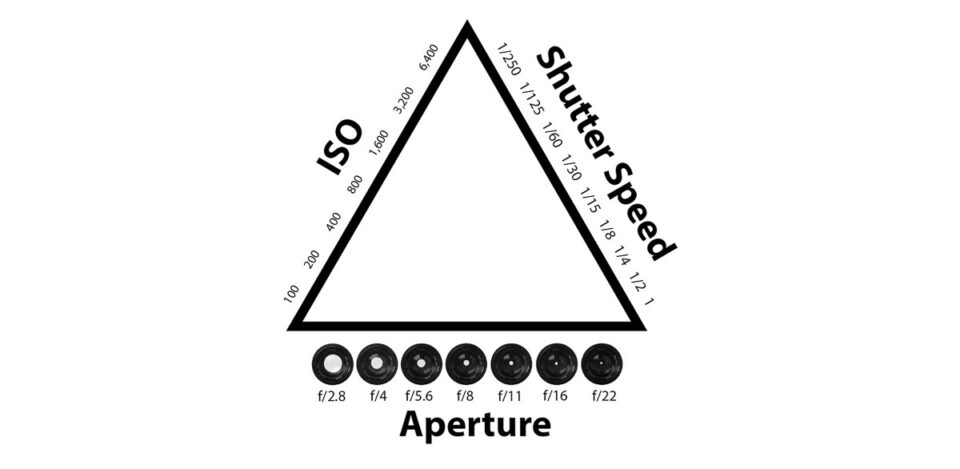 I took this course last year and I remember doing similar tasks for my introduction. I learned everything that I have already went through within the last few lessons, it was a good refresher though as over the summer holidays some of the things that I have learned fell out of my head. But now I am fully capable of handling a camera and creating a simple film.
 To create a shallow depth of field you have to have a low f-stop. This will allow one item which is close to the camera to be in focus whilst everything behind that item will be out of focus giving it a authentic look.
We learned how to import our footage onto a mac and we also learned how to arrange our 'bins' so that we wont have our footage, audio and titles mixed up with one another so that our editing experience will be much easier.
To import the footage from a camera to a mac we need a SD card, this will record all of the information we need such as photographs and film. We then plug the SD card into the mac and move the files into a personalized folder which will contain all of the footage.
To edit all of the footage we used the program Adobe Premiere Pro, we learned the basics of editing.
We were given a task in which we have had to use a zoom or zoom out, we had to change the speed of the footage either quicker or slower, and also we had to use a variety of transitions so that the footage wont end up really boring. This was a good insight on how to use premiere pro and it allowed me to refresh all the knowledge that I learned from last year.
I got my music from the website called www.incompetech.com.
Here you can use all of the music which is displayed as long as you use the link provided to credit the owner of the music. Without crediting the author of the song there may be a chance of getting copyrighted.
Another website is www.bensound.com. Yet again you have to credit the website along side the name of the song.

This is a nice shot due to how steady it is and also how i manage to zoom in on to Mr David Davidson.
What could have been improved on this shot is the focus. It was not focused on anything which gave the shot a somewhat grainy look when it was zoomed in.
If i were to focus on David, the shot would have looked a lot better.
Wednesday, July 3, 2019
Tuesday, July 2, 2019
Monday, July 1, 2019
Subscribe to:
Posts (Atom)